Herewith please find enclosed a rant about WireGuard.
Use Case
I have a simple reason to want a VPN, and a convoluted reason. The simple reason is that Taiwan is outside the comforting embrace of the EU, unprotected by GDPR or DSA. I would like the option of connecting from, say, Finland, and improving the odds of my digital rights being respected. The convoluted reason is that I’ve got some self-hosted services that cannot be entrusted to a data centre, and I’m hoping I can route incoming traffic over a VPN to a Raspberry Pi in my apartment.
Obviously here we’re talking about some form of self-hosted VPN. Commercial VPNs are just an opportunity to hand control to some of the most dubious people in tech. The field attracts “libertarians”, an ideology that ultimately believes it’s up to each individual to look out for themselves. Inevitably this allows them to justify exploiting their customers, who should have been caveat emptoring. Running commercial VPNs also leads to the belief that neither the operators nor the customers should be bound by democratic laws. So it’s no surprise when they end up siding with Nazis.
History
For many years I’ve been hosting VPNs on a VPS. Using PPTP. Boo! Hiss! Crowd throws rotten vegetables. PPTP is ancient technology. It’s been thoroughly compromised. I should be ashamed of myself.
It does, however, have an advantage: at least last I checked, it’s not blocked in China. I experimented with OpenVPN. The Great Firewall works in a fun way. They deep packet inspect, and after a few packets of OpenVPN they see what you’re doing. But they only block the connection after 15 minutes. So you get it set up, you test it out, you pat yourself on the back, you start browsing your forbidden content. And then suddenly… oops, busted. In some cases I’ve had my whole Internet connection blocked for a short period as a punishment. It turns out this is a powerful motivation to stop fucking with the system. For some reason PPTP doesn’t, or didn’t, get this treatment. I guessed that’s because it’s supported by old versions of Windows, and corporates need that. Corporates don’t use OpenVPN.
And there’s the old standby of ssh -D. Again, big corporations have legions of tech support that absolutely must ssh all over the place. You can’t block ssh. But ordinary Chinese punks and hippies and other troublemakers don’t use the command line. So this can be tolerated.
I have, of course, tried IPsec. Let’s just not talk about that.
WireGuard®
But all of that was years ago. Since then WireGuard has arrived on the scene.
WireGuard® is an extremely simple yet fast and modern VPN that utilizes state-of-the-art cryptography. It aims to be faster, simpler, leaner, and more useful than IPsec, while avoiding the massive headache.
“Extremely simple”. Please, if you work in technology, I am begging you: never describe anything you built as “simple”. There really ought to be some kind of universal code of conduct to sign up to that includes that rule. Saying “extremely simple” should get you kicked out of the club permanently.
WireGuard® is not simple. I’ve spent like a month trying to get this to work.
Demarcation
Before I start complaining, let’s set one important ground rule. Like any open-source project, WireGuard is just the accretion point for an agglomeration of related projects. In most cases you don’t interact with the core WireGuard system. You interact with some kind of UI that connects it to your operating system.
Where lies the boundary between “WireGuard®” proper and these satellite projects? I DO NOT GIVE A FUCK. I’m just a user. I don’t have space in my brain to accomodate the boundary disputes of random tribes of angry nerds. If you are a core WireGuard developer, you get the blame for anything with the word WireGuard slapped on it. You should expect and accept that.
WireGuard UI
So let’s talk about Yunohost. By which I mean the WireGuard Server package. By which I mean wireguard-ui. Which, it turns out, has been dead since 2023. I’m using this because all of the WireGuard tutorials out there are complicated and contradictory, so when it doesn’t work I can’t tell if I did something wrong, or the tutorial was AI, or if something just changed. So I’m thinking, let’s use a proper UI that will hold my hand.
So here it is. Cool, huh? I can click “New Client”, enter some stuff, click “Submit”, and up pops a new little box with my stuff in. A reassuring green banner says “Created new client successfully”. A “Download” button on the box gives me a file I can then import into various clients. All very straightforward.
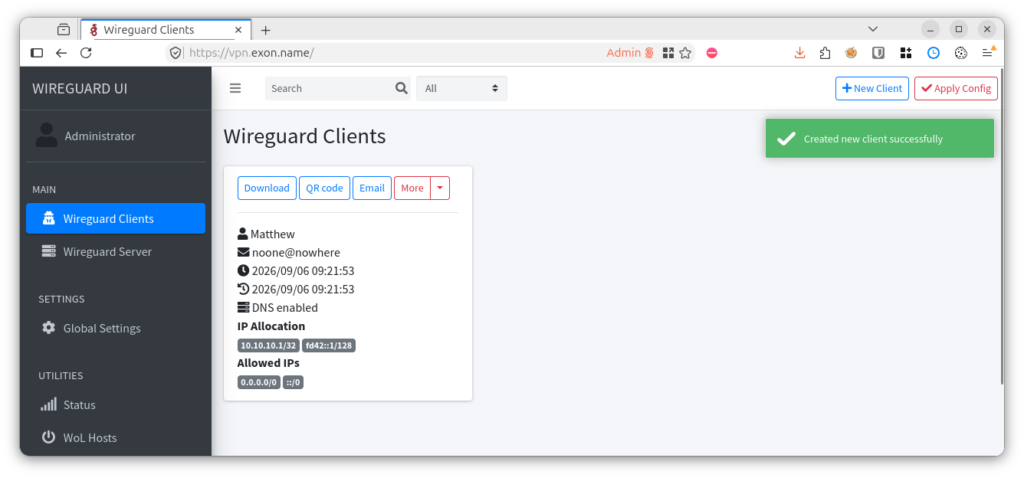
Did you notice the problem? There’s a red button above the green banner labelled “Apply Config”. This is the only visual indication of something quite salient: the client I just created does not exist. It’s stored in a JSON file inside WireGuard UI’s storage. But the thing has not yet changed the configuration in the operating system, not even after a reboot. It doesn’t take effect until you click that red button. Which is a UI affordance it took me a month to notice.

Config
How did I spend that month? Why, fiddling with the real config file, bouncing from tutorial to tutorial trying to create temporary configuration that might work.
Of course I noticed that almost everyone wants a [Peer] section in the config file, and WireGuard UI hadn’t produced one of those. Kinda a giveaway that there are no clients configured, right?
But I’m used to that. They took away sources.list, put everything in a conf.d directory instead. They took away resolv.conf, it disappeared into systemd somewhere. On Yunohost users don’t even show up in /etc/passwd. By now it’s entirely standard practice that the entire Internet says you have to edit /etc/foo/bar.conf, and when you get there bar.conf just has a banner saying “nobody home, go away”. This is why I naturally assumed that with WireGuard UI managing things, the configured clients were being secretly smuggled into WireGuard through some undocumented backdoor channel. That’s just how Linux works these days, right?
Which is to say, all of this is Lennart Poettering’s fault. But you already guessed that.
Gnome
Gnome actually includes built-in support for WireGuard. There’s a whole dialog for adding your configuration. Fiddly, but convenient.
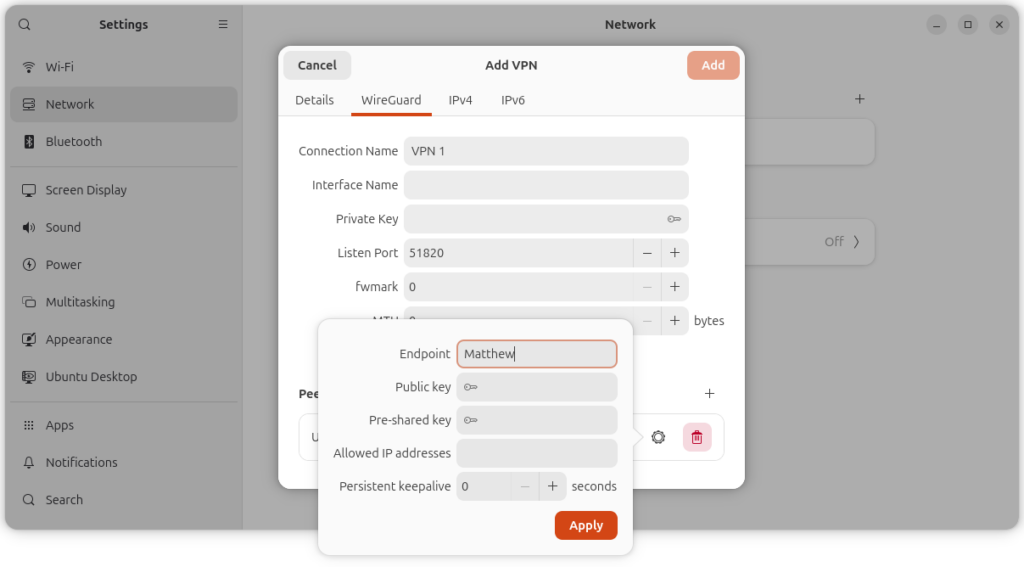
Notice the space for the Public key and the Pre-shared key. Both of those are long random strings. You can’t type them, you have to copy-paste them. In a darkly hilarious twist, if you change windows to retrieve the second key, the whole dialog collapses and throws away your work. I literally never figured out how to make this dialog box actually work. And it doesn’t provide a way to import from config file either.
In the end the only way I found to configure a WireGuard tunnel is the command line:
$ sudo nmcli connection import type wireguard file $HOME/Downloads/matthew.confDebugging
So I just hacked up wg0.conf myself. Given that WireGuard® is so extremely fucking simple, this should be easy right?
It took me aaaaages to work through that. The most fundamental problem here is that whether it’s the command line or a “friendly” desktop, if you switch on the VPN, it appears successful. You can misconfigure things in a hundred ways, but the UI will tell you everything’s fine.
In practice, for the “extremely simple” VPN system to work, the following need to happen:
- The server needs to be listening on the configured endpoint
- The client needs to be configured with the correct endpoint
- The network in between should not block or drop packets
- The server public key needs to be configured on the client
- The client should be configured on the server, including the public key
- OH HELLO the same pre-shared key should be configured on both sides
- The server OS must be configured to forward packets
- The server needs to NAT the client’s VPN connection
So I spent forever systematically going through all the reasons I could think of that things might be going wrong. My best guess was number 8. In fact I found that explanation so convincing, I risked poking my head over the parapet to ask about it. I avoid doing that because of, well, you know what it’s like out there. In this case, at least my question was ignored. Coulda been worse.
My biggest real problem, number 6, was not one of the ones I could think of. I had to rule out all the others before I got there.
Allowed
In order to debug this further, I spent actual real money and bought myself some experimental VPS’s. These I set up with either Ubuntu (resembling my laptop) or Debian 12 (used by Yunohost), and did various kinds of fresh-OS experiments. These tended to go well, as you’d expect.
I mean, they sorta went well. The configuration you download from WireGuard UI includes this line:
AllowedIPs = 0.0.0.0/0,::/0This is a very badly named configuration option. It’s not “allowing” anything. What it does is, when the connection comes up, those networks are sent through the VPN.
Actually I don’t quite understand this. If my VPN endpoint is 1.2.3.4, I can’t very well route traffic to 1.2.3.4 through the VPN. But since WireGuard is in the kernel, persumably the kernel sorts out the mess.
But as a default, this is rather problematic. If for any of the reasons I listed the VPN isn’t actually working, it’ll just happily redirect traffic through that non-functional network. Which, if you’re controlling this by ssh’ing to a VPS, is kinda a problem.
Oops. The default configuration is designed to brick your device. Isn’t that cute? I’m very glad I spent the money on fresh VPS’s, instead of experimenting on a server that was actually doing something.
NAT
My second best guess was that the actual network was blocking UDP somehow. Unlikely, since I tried the mobile network too. And wouldn’t that break VoIP? But who knows, it’s all about the port numbers. Could be a Taiwan thing.
To rule that out, I had to read up on NAT and hole-punching. I actually still don’t get how this can work. What happens if two NATted clients want do use the same port? That must happen all the time? Nevertheless, I’m pleased enough about eventually getting this working that I’m just gonna dump a slightly redacted transcript in here.
$ date ; nc -v -u -l -p 8095
Sat Sep  5 10:07:39 AM UTC 2026
Bound on 0.0.0.0 8095
Connection received on host-AAA-AAA-AAA-AAA.static.kbtelecom.net 40225
hello^C
$ date ; echo -n hello | nc -v -u BBB.BBB.BBB.BBB -p 40225 8095
Sat 5 Sept 18:07:41 CST 2026
^C
$ date ; nc -v -u -l -p 40225
Sat 5 Sept 18:07:46 CST 2026
Bound on 0.0.0.0 40225
Connection received on static.BBB.BBB.BBB.BBB.clients.your-server.de 8095
XXXXXworld^C$ date ; echo -n world | nc -v -u AAA.AAA.AAA.AAA -p 8095 40225
Sat Sep 5 10:07:53 AM UTC 2026
Connection to AAA.AAA.AAA.AAA 40225 port [udp/*] succeeded!
^CWhat you’re seeing there is that I’m running a server on my public host listening on UDP port 8095. Then on my NATted host I send “hello” to it from port 40225. On the sever the message is received, and in verbose mode it confirms which port it got sent from. Since this is NATted, it could have been mapped to something other than 40225, but in this case it kept the original port number.
Then, quickly before the mapping times out, I start a server on the NATted host, and send “world” back from the public host. This arrives! Along with five X’s for some reason. Not sure what’s going on there. But anyway, this proves that UDP is working in both directions.
Since that worked, it was a complete waste of time – that was not the problem.
Masquerade
Another thing I had to rule out was that IP masquerading was set up properly. Many tutorials recommend configuring this on the server:
PostUp = iptables -A FORWARD -i %i -j ACCEPT; iptables -t nat -A POSTROUTING -o eth0 -j MASQUERADE
PostDown = iptables -D FORWARD -i %i -j ACCEPT; iptables -t nat -D POSTROUTING -o eth0 -j MASQUERADE
Sounds like a good idea! But WireGuard UI configures no such thing. So I experimented with adding it.
We can check what’s happening, using iptables.
$ which iptables
$
Sigh. What fresh hell is this?
$ sudo /usr/sbin/iptables-legacy -t nat -L -n -v
Chain PREROUTING (policy ACCEPT 0 packets, 0 bytes)
 pkts bytes target     prot opt in     out     source               destination

Chain INPUT (policy ACCEPT 0 packets, 0 bytes)
 pkts bytes target     prot opt in     out     source               destination

Chain OUTPUT (policy ACCEPT 0 packets, 0 bytes)
 pkts bytes target     prot opt in     out     source               destination

Chain POSTROUTING (policy ACCEPT 0 packets, 0 bytes)
 pkts bytes target     prot opt in     out     source               destination
So it’s iptables-legacy now, is it? Not what the tutorials say. Rugpull after rugpull. Was this really necessary? Was the existence of iptables what was holding us back? Now that we’ve got rid of it, does that mean it’s the year of Linux on the desktop?
Since there’s no masquerading set up, this proved to me that the PostUp and PostDown thing the tutorials ask for really was necessary.
That’s why it came as a shock, after I’d got it working, that I could remove those lines with no ill-effects.
Whatever. I give up.
Pre-shared key
As I hinted earlier, this is what really turned out to be my problem. The downloaded config file contains an item PresharedKey that I didn’t understand. Because I hadn’t applied my changes, that key was only stored on the server inside an obscure JSON file. The result seemed to be that the server was accepting data from the client (?) but the client wasn’t accepting data from the server. Silently though, obviously.
Baaack way the fuck up. Pre-shared key?
One of the alleged improvements of WireGuard is that it uses public key cryptography. Each side of the connection only needs the public key of the other, not any secrets. This is because sharing secrets is insecure by design. Always a vulnerability. Public key cryptography removes that entirely. That’s the whole fucking point. If you’re sharing a secret, why are you using public key cryptography at all?
Compounding this, I can’t find any documentation of PresharedKey on either the official documentation or the unofficial documentation. Why does this exist?
To answer that, the definitive source of truth is Reddit.
The purpose is to be resistant to the potential threat of Quantum Computers.
My dude. Please. There is no such thing as a practical quantum computer. There will never be any such thing as a practical quantum computer. You are dreaming. Worse, you are playing into the hands of billionaire grifters, who are lining up to make quantum computing the next bastion for their wealth after the current AI bubble implodes. This is not a thing people should be spending their time on.
But even then…
Just chucking a second symmetric encryption layer inside the public key encryption is not a solution! If the quantum computer gets invented, you now only have the pre-shared key to defend yourself. And it’s vulnerable, because it’s a pre-shared key. If that vulnerability can be managed to make the risk acceptable, just use symmetric encryption! Don’t bother with the public key crap. It’s one or the other. Pick a side.
Two half-secure solutions layered inside each other do not make a secure solution. That’s especially true with LLMs picking apart your defenses piece by piece. What you have here is one bad solution providing a false sense of security about the threat to another bad solution. And one important lesson, of life and of computer security, is that a false sense of security is worse than nothing.
Keys
Oh, while we’re on the subject of public key cryptography. Allow me to demonstrate how serious software looks:
$ age-keygen
# created: 2026-09-06T10:43:11+08:00
# public key: age1sntd7xd2sgr6993h4ld5yg53qz8zc56wg0xshqgc787yz9wkr54sftjme9
AGE-SECRET-KEY-1YX8AGG22LL4TWX0T7ZT5E6GHFN5H608M6AYQY8EQY25W3ZMFYXFSEKRALN
Compare and contrast how muppet software looks:
$ private=$(wg genkey); echo $private; echo $private | wg pubkey
IIuiKDJWTdnCxjMwIjxCHaOQw6XjdawTiBYySVwdjnY=
cHTrVKLIDBDD4PtKFaB0jGCTOVk512pRsRkGpnAqj0g=
What do you notice? Public keys are meant to be public. You are required to send them to people, often strangers. Private keys are meant to be private. It is critical that you never send them to people. In fact, good security practice stresses that you can prove that you have never leaked your private keys.
That is why serious software makes extremely clear that secret keys are secret. There is a string prepended that says SECRET-KEY. You can’t miss it. If you omit that context, the software won’t let you use it. What’s more, the string of random characters is all upper case. This is a warning. Even GPG gets this right.
WireGuard uses public and private keys that are completely indistinguishable. If you send the public key to your colleague on slack, but paste the private key instead, neither of you will notice. In the subsequent back and forth, debugging and retries, once you’ve eventually got it working, neither of you will notice that turd sitting in your chat history. But guess what, that key has now been compromised. It will work fine, but you’ve left the front door unlocked.
It is guaranteed that around the world, thousands (probably millions) of WireGuard tunnels are running today with compromised keys.
In 2026, computer security is almost all about user interface design. If you think you work in computer security but you spend your days messing with encryption algorithms, you are holding it wrong. That is not where the threats lie, and your work is not helping anyone.
WireGuard was built by exactly such self-described security researchers. This problem alone makes it unfit for purpose. It is not secure, when security is its only purpose.
Errors
Look, there’s a lot of bugs here. But as always, my complaint is not about the bugs. I’ve written a lot of software. Mistakes get made.
The inexcusable part here is the same as it’s always been. Everything is built on the happy case. There is no error checking, and there are no usable error messages.
Would it be so hard to check that packets are coming out the other end of the tunnel before changing the routing tables to redirect absolutely everything through?
If we’ve got symmetric encryption inside public key encryption, would it be so hard to first check that the public keys match, and then check that the symmetric keys match, and report those as separate results to the user before going further?
Would it be too hard to check if the server even has us registered as a peer, and report that separately?
Testing
None of these things are part of the culture. The developer is an expert and intuitively knows not to make any mistakes. It’s impossible for a developer to imagine themselves in a mindset that would find any of this confusing.
My experience is that developers try to imagine themselves as users, and sometimes succeed. But ultimately you are always setting a developer up for failure if you leave them on their own. Even having other developers do the code review doesn’t help at all.
Open source suffers because only developers have the motivation to invest time in the project. Testing is a hard, unrewarding, unloved profession. Your job is to sit between people trying to get things done and people wanting things to get done, and say “no” to both. Why would anyone subject themselves to that for free?
Only in the very best run private enterprises, usually with the highest stakes, is user testing taken seriously, and testers given the appropriate rewards and authority to commit to their profession. Unfortunately, the producer surplus necessary to fund such people is only found inside more-or-less evil, exploitative corporations.
So my experience with WireGuard is an anecdote, but an illustrative one. We don’t have a way out of this trap we built for ourselves.